

You are here: Home / Additional modules / Marketplace / Provider overview / onOffice Services - AI Studio - Cost management
Marketplace
onOffice Services – AI Studio – Cost management
Access to the AI Studio and cost management
There are two ways to access the AI Studio:
-
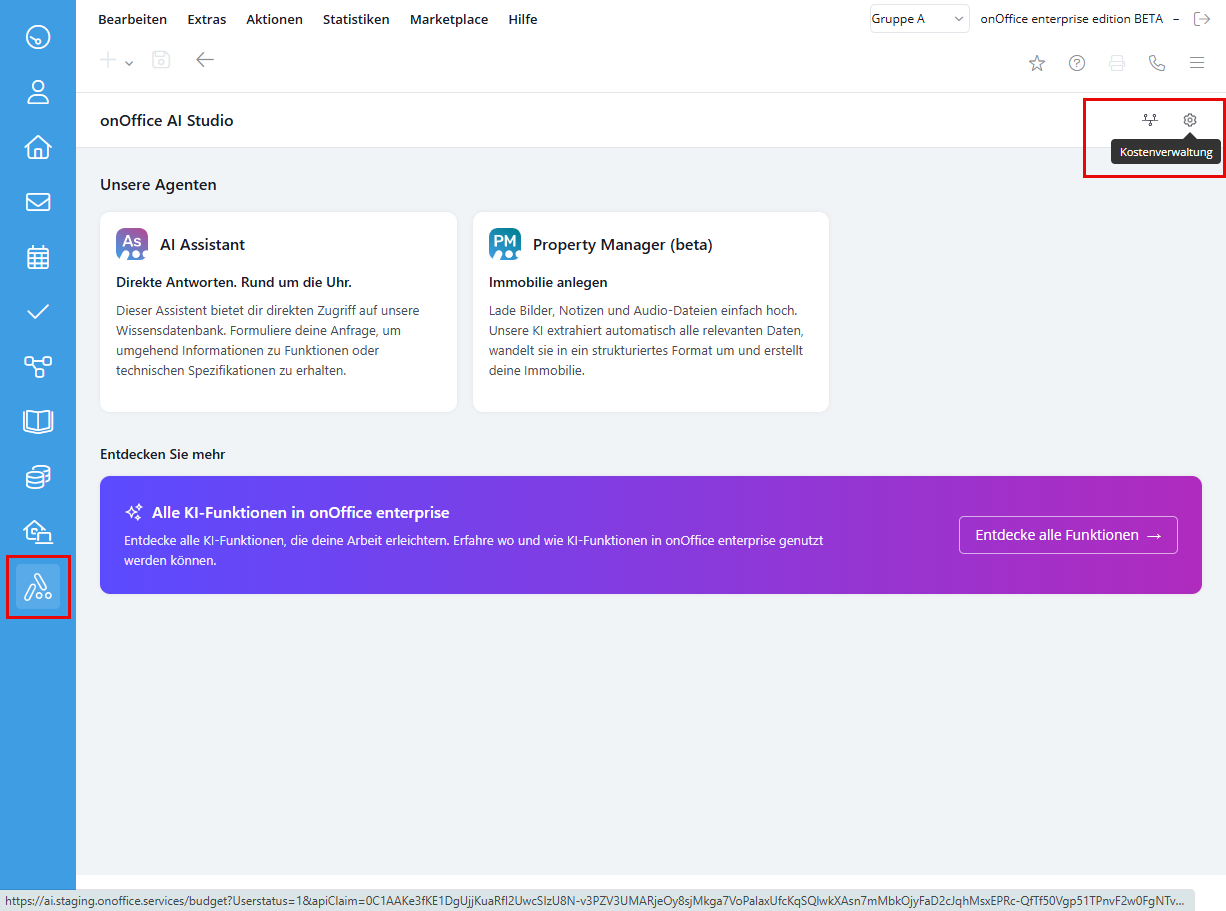
Via the right sidebar: Click directly on the AI Studio icon in the quick access bar on the right-hand side of the screen.
-
Via the main menu: Navigate to Marketplace → onOffice AI Studio → AI Studio.
-
Cost management: In the AI Studio overview, you can access the cost settings directly via the cogwheel icon in the top right-hand corner. (You need the administrative right “Administrator” for this.)
Budgeting
As an administrator, you can control how the monthly limit is applied in cost management:
-
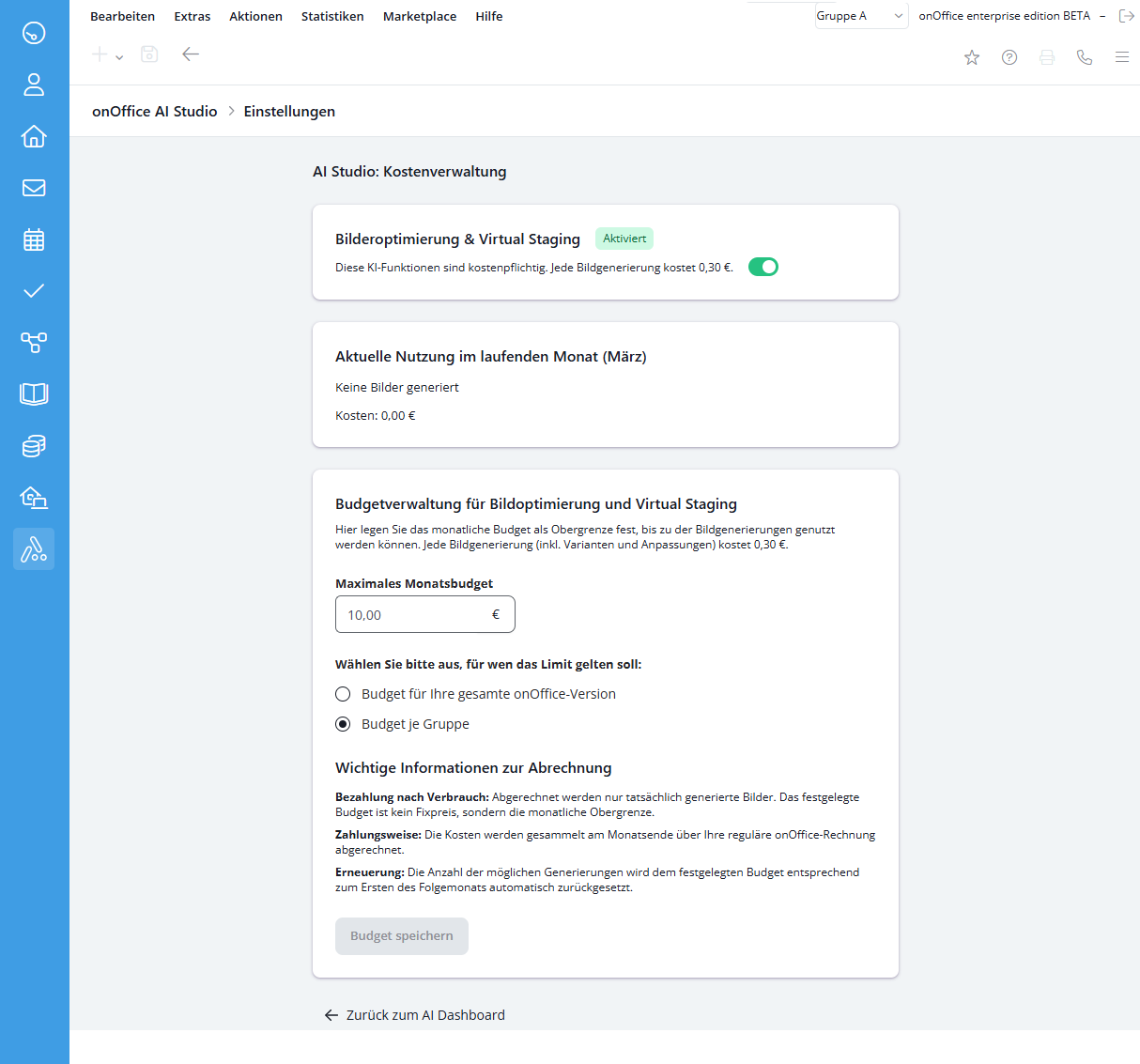
Services: Activate or deactivate functions such as “Image optimization & virtual staging” (costs: currently € 0.30 per generation).
-
Maximum monthly budget: Enter your desired limit here.
-
Validity range of the limit:
-
Budget for your entire onOffice version: All users share a common overall budget.
-
Budget per group: The entered limit applies separately for each individual user group.
-
- Save: Confirm your entries by clicking on “Save budget”.
Rights management (users)
In order for users to be able to use the AI Studio, the corresponding authorizations must be active:
-
Navigate to Extras → Settings → Users.
-
Select the desired user and open the Rights tab.
-
Activate the onOffice AI Studio checkbox in the Marketplace – external services area.
- To administer the AI Studio and access cost management, you also need the administrative right “Administrator”.
Cost transparency
-
Budget display in the tool: As soon as a user starts a function (e.g. Virtual Staging) in a property, the remaining quota is displayed at the bottom of the window (e.g. “Limit (ind.): 3 generations still possible”).
-
Price transparency: Users can view the current conditions and billing modalities at any time via the “More information” link in the processing window.
- Value added tax on marketplace purchases
- Assign debits via reference ID
- Provider overview
- onOffice Services - PriceHubble Valuation Service
- onpreo - Property acquisition
- Wordliner - Acquisition marketing software
- Space Renovator- Virtual Homestaging
- onOffice Services - DocuSign Connector - digital signatures
- onOffice Services - Newsletter Connector
- onOffice Services - WKO Marketplace - Portal for joint business in Austria (MLS)
- onOffice Services - Zapier - Data exchange and automation
- PriceHubble Deutschland GmbH - Interactive property value analysis
- propform.io - Webforms
- PropNow - Digital quotation process
- PROPUP - Digital form & workflow management
- Residenture - Online auction platform
- onOffice Services - Gender API
- Sprengnetter property Valuation
- Sprengnetter - Real estate valuation in Europe
- Total Render - Floor Plans Italy
- ViertelCheck - Information on the micro and macro situation
- finioo - Application folder
- Backbone - Property images
- BOTTIMMO - Marketing software and digital acquisition
- ESYSYNC - Display systems
- FPRE - property analysis and valuation
- Geolyzer - infrastructure data
- immo-billie - Digital bidding process
- Immogrundriss - Floor plans & visualizations
- immowriter - AI for property texts and images
- Kerberos compliance management systems
- KIM real estate valuation
- Lead Import
- Tenant check - credit check of prospective tenants
- MYVIVENDA - Print on Demand
- Ogulo - 360° tour
- onOffice Services - PhotoDesigner
- onOffice Services - AI-Writer - AI for property texts
- Service not usable?
- Unlock/lock provider
- Manage account
- Create account

Entry
Dashboard
Contacts
Properties
Email
Calendar
Tasks
Acquisition Cockpit
Audit-proof mail archiving
Automatic brochure dispatch
Billing
Groups
Intranet
Marketing Box
Multi Property module
Multilingual Module
onOffice sync
Presentation PDFs
Process manager
Project Management
Property value analyses
Enquiry Manager
Showcase TV
Smart site 2.0
Statistic Tab
Statistics toolbox
Success Cockpit
Time Tracking
Address from clipboard
Text block
Customer communication
External Tools
Favorite links
Calculating with formulas
Mass update
onOffice-MLS
Portals
Property import
Quick Access
Settings
Templates
Step by step