
 Entry
Entry Dashboard
 Contacts
 Properties
 Email
Email Calendar
 Tasks
Tasks Acquisition Cockpit
 Audit-proof mail archiving
 Automatic brochure dispatch
 Billing
 Groups
 Intranet
 Marketing Box
 Marketplace
 Multi Property module
 Multilingual Module
 onOffice sync
 Presentation PDFs
 Process manager
 Project Management
 Property tracking
 Property value analyses
 Enquiry Manager
 Showcase TV
 Smart site 2.0
 Statistic Tab
 Statistics toolbox
 Success Cockpit
 Time Tracking
 Address from clipboard
 Text block
 Customer communication
 External Tools
 Favorite links
 Calculating with formulas
 Mass update
 onOffice-MLS
 Portals
 Property import
 Quick Access
 Settings
 Templates
 Step by step


You are here: Home / Additional modules / Marketplace / Provider overview / Wordliner - Acquisition marketing software

Marketplace
Wordliner – Acquisition marketing software
Inhaltsverzeichnis
Description
HouseToSpot Warm Acquisition (Wordliner) is a smart acquisition marketing software that allows you to identify the interests of your customers that make a purchase or sale likely. This makes it easy for your purchasing team to recognize order opportunities in good time and not leave them to chance.
Connect onOffice with HouseToSpot and GetResponse, offer your customers suitable information offers on a regular basis and receive real-time evaluations of when and on which topic your contacts react to your activities. Evaluate sales opportunities and qualify your warm leads directly via HouseToSpot.
Utilization:
You need your own HouseToSpotand GetResponse accountto be able to use the service via onOffice.
Please connect your onOffice client in your HouseToSpot account under “Edit organization”, as shown in the screenshot below.
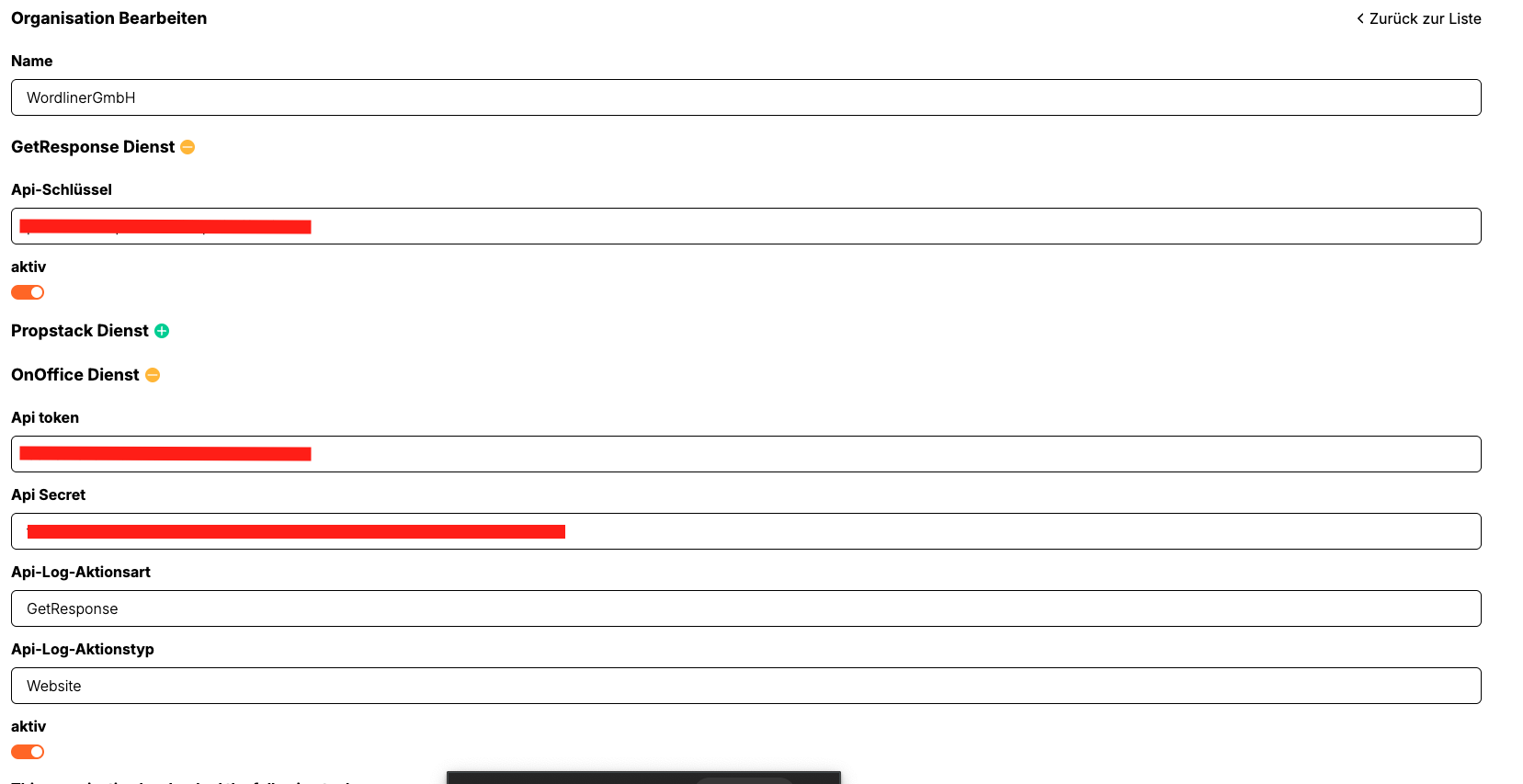
The service is available after activation in the Marketplace. By using a service webhook, you can synchronize your onOffice contacts with HouseToSpot and GetResponse.
Instruction
How to start with House2Spot in onOffice:
1. Open application in Marketplace
Open the onOffice Marketplace and select House2Spot – your acquisition software.
2. Connect
Create the technical connection via the Marketplace. This prepares the necessary token exchange between onOffice and House2Spot.
3. Book the right package
After connecting, switch to the paid product and select the package or modules that are right for you. Depending on requirements, different priorities can be set, for example
- Price determination with PriceQ
- Warm acquisition and portfolio activation with LeadQ
- Digital provision of property offers with ImmoPush to ChatGPT
4. Start onboarding
After booking, the onboarding process begins.
This is determined jointly:
- Which modules are used
- Which interfaces and processes should be active
- how the setup should be carried out in your company
- which information should be visible to owners, teams or contacts
5. Use in everyday working life
On completion of onboarding, the booked functions are available to the intended extent. Depending on the module, you can then, for example:
- Classify property prices in a more structured way
- Prepare owner valuations in a comprehensible manner
- Activate existing contacts via e-mail marketing
- Integrate property offers into additional digital usage channels
Typical procedure after booking
Step 1: Connect via the Marketplace
Step 2: Select House2Spot Package
Step 3: Perform onboarding for the booked modules
Step 4: Set up processes, visibilities and applications
Step 5: Using House2Spot in everyday brokerage
Important note
SocialQ is available separately as a standalone freemium application and is not part of this paid House2Spot tile.
House2Spot bundles the paid acquisition modules within one system.
LeadQ – Automated contact synchronization for onOffice and GetResponse
LeadQ is a technical solution for connecting your real estate agent software onOffice with the email marketing tool GetResponse. The aim is to make your communication processes more efficient and to make meaningful information about the behavior of your contacts directly visible in the CRM – without manual maintenance effort.
Functions at a glance
– Automatic synchronization of your contacts
New contacts from onOffice are automatically assigned to your selected GetResponse list.
– Feedback of response data
Openings, clicks or unsubscribes from your recipients are fed back to onOffice in real time.
– Actuality in both systems
Your databases remain consistently up to date.
Advantages for your work as a real estate agent
– Time savings: No manual transfer of contacts between systems.
– Better assessment of sales opportunities: Reactions to mailings are directly visible in the CRM.
– More targeted follow-up: The activities of your contacts enable you to address them precisely.
– Structured warm acquisition: LeadQ supports you in systematically activating existing contacts.
Setup and requirements
To use LeadQ, you need:
– A LeadQ account (provided via HouseToSpot)
– A GetResponse account
– A onOffice-client
Contact and further information
If you would like to set up or test LeadQ, please contact Wordliner GmbHdirectly.
Our team will support you with the connection and advise you on how best to use it in your day-to-day real estate agent business.
You can find more information about Wordliner here. If you would like to book or try out the service, please contact Wordliner directly.
You can find instructions for GetResponse itself on the GetResponse help pages .