 Entry
 Dashboard
 Contacts
 Properties
 Email
 Calendar
 Tasks
 Acquisition Cockpit
 Audit-proof mail archiving
 Automatic brochure dispatch
 Billing
 Groups
 Intranet
 Marketing Box
 Marketplace
 Multi Property module
 Multilingual Module
 onOffice sync
 Presentation PDFs
 Process manager
 Project Management
 Property tracking
 Property value analyses
 Enquiry Manager
 Showcase TV
 Smart site 2.0
 Statistic Tab
 Statistics toolbox
 Success Cockpit
 Time Tracking
 Address from clipboard
 Text block
 Customer communication
 External Tools
 Favorite links
 Calculating with formulas
 Mass update
 onOffice-MLS
 Portals
 Property import
 Quick Access
 Settings
 Templates
 Step by step


You are here: Home / Additional modules / Marketplace / Provider overview / VR-Energie & ImmoService GmbH - VR Energy Performance Certificates

Marketplace
VR-Energie & ImmoService GmbH – VR Energy Performance Certificates
Description
An energy performance certificate is required for many properties. Apply for your certificate conveniently and easily online.
✅ Get an energy performance certificate generated online
Do you need an energy performance certificate for your property? VR-Energie & ImmoService makes the process simple and straightforward. You can conveniently submit all the necessary information and documents through our online service. Qualified energy experts will then issue the appropriate energy performance certificate.
✅ Which energy performance certificate is required?
Depending on the building and the situation, either an energy consumption certificate or an energy demand certificate may be required. The type of certificate required for your property depends, among other things, on the building’s year of construction, size, and energy efficiency.
✅ For Sale and Rent
A valid energy performance certificate is required, in particular, when selling or renting properties. It provides prospects with important information about the building’s energy performance and includes, among other things, data on energy consumption and energy demand.
✅ Apply online easily
From application to issuance: Our online service makes the process simple—without unnecessary trips and with minimal effort.
Is an energy performance certificate required? Apply online now and have it created for you with ease.
In addition, VR-Energie & ImmoService is also here to assist you with any other questions you may have regarding energy, properties, and energy-efficient renovations.
Activation
Simply activate “VR Energy Certificates” here in the Marketplace.
Instruction
Order an Energy Performance Certificate directly from onOffice
Quick Guide for VR-Energie & ImmoService
Order your energy performance certificate directly from the property in onOffice. Existing
property data is carried over. You fill in the missing information, upload photos of the heating system, and
complete the order through the onOffice marketplace.
Requirements: The service has been activated on the onOffice Marketplace. Have the building information and photos
of your heating system ready. Required fields are marked with an asterisk (*)
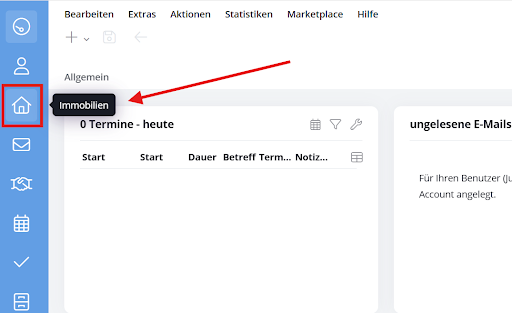
1. Open property
Click on “Properties” in the main navigation bar on the left
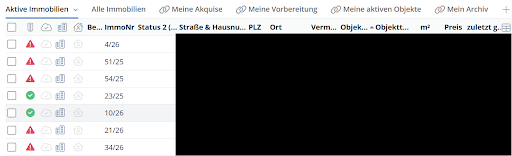
2. Select the property you’re looking for
Select the property you want from the list and open it.
3. Launch VR Energy
Click the icon with the stacked layers in the lower-right corner. Select “VR Energie” and then “VR Energy Performance Certificates.”
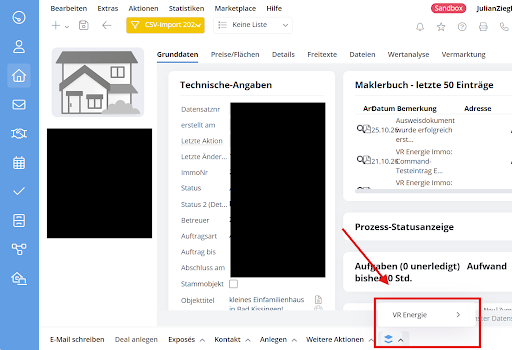
Image placeholder: Action Bar and Selection of the VR Energy Service.
4. Select Certificate Type
Select “Requirement-oriented certificate” or “Energy consumption data” and click “Next.” If a transaction has already been saved for this building, you can continue it by clicking “Click here!”
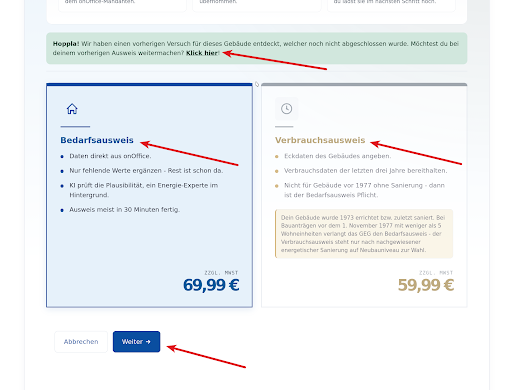
Select the certificate type and click “Next” to continue.
5. Check and Complete Building Data
Check the data imported from onOffice. Fill in the required fields and any missing information about the building, structural components, windows, doors, and heating system. Click “Next” to move through the sections. If there isn’t a photo of the property yet, upload one first.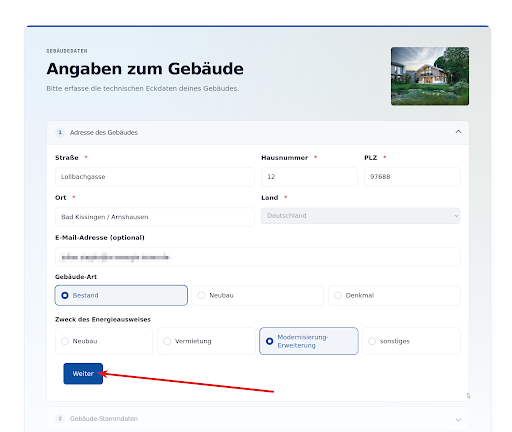
Review the imported property data and fill in any missing information.
6. Upload photos of your heating system
Drag one or more photos of your heating system into the upload area, or select them by clicking on them. Then click on “Check Heating System.”
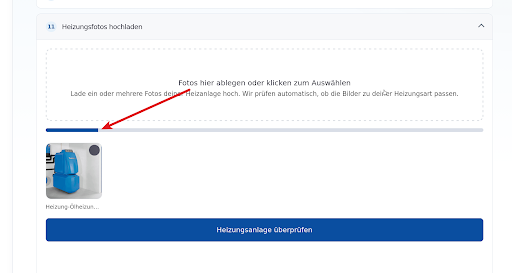
Upload photos of your heating system and start the automatic inspection
7. Verify the information and start the system check
Check the summary. You can correct your information by clicking “Back to Edit.” If everything looks good, click “Start System Check” and confirm the next step.
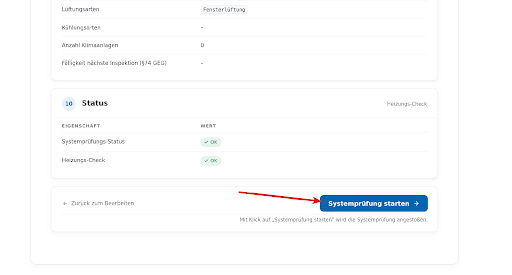
Review the summary and start the system check.
8. Complete the Order and Payment
After the review is complete, please confirm the Terms and Conditions and the Revocation Policy. Click “Pay now via onOffice.” Review your order on the onOffice Marketplace and complete it by clicking “Place Order with Payment.”
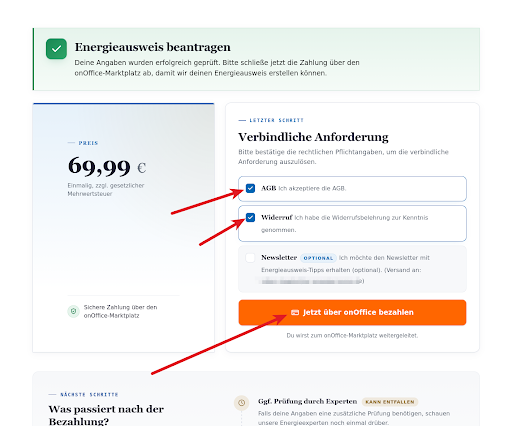
Confirm the legal information and initiate the payment through onOffice.
9. Receive the completed energy performance certificate
Once payment is complete, your energy performance certificate will be issued. If an additional review is needed or if there are any questions, VR-Energie will contact you. The completed certificate is assigned to the property in onOffice as an internal file.
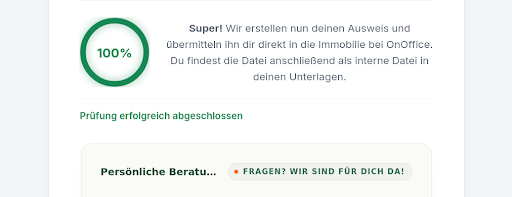
Once it has been successfully created, the ID is assigned to the property.
Tip: You can pause the process and restart it later for the same property.