 Entry
Entry Dashboard
 Contacts
 Properties
 Email
Email Calendar
 Tasks
Tasks Acquisition Cockpit
 Audit-proof mail archiving
 Automatic brochure dispatch
 Billing
 Groups
 Intranet
 Marketing Box
 Marketplace
 Multi Property module
 Multilingual Module
 onOffice sync
 Presentation PDFs
 Process manager
 Project Management
 Property tracking
 Property value analyses
 Enquiry Manager
 Showcase TV
 Smart site 2.0
 Statistic Tab
 Statistics toolbox
 Success Cockpit
 Time Tracking
 Address from clipboard
 Text block
 Customer communication
 External Tools
 Favorite links
 Calculating with formulas
 Mass update
 onOffice-MLS
 Portals
 Property import
 Quick Access
 Settings
 Templates
 Step by step


You are here: Home / Additional modules / Marketplace / Provider overview / IMMOinstant - Appointment booking tool

Marketplace
IMMOinstant – Appointment booking tool
Activation
Activate the IMMOinstant easily in the Marketplace. You will then find the service in each property on the “Dates” tab.
Description
With IMMOinstant, prospects can book a viewing appointment online directly after their inquiry, fully integrated into the existing CRM systems of onOffice.
Real estate agents benefit from automated reminders, follow-ups and no-show reduction. Real-time reporting provides full transparency on leads, appointments and success rates. Additional services such as insurance or financing can also be incorporated via the integrated sales funnel.
IMMOinstant is ready for immediate use, GDPR-compliant, scalable for individual real estate agents up to large organizations and saves valuable time in the back office. Our motto: Less back office. More deals.
IMMOinstant – Step-by-step guide
With IMMOinstant, you can answer property inquiries fully automatically via WhatsApp & e-mail and enable prospects to book appointments immediately.
Follow these instructions to activate IMMOinstant in onOffice and set it up correctly.
1. Calendar synchronization
Your calendar must be connected so that prospects can book appointments automatically.
1. Log in to your IMMOinstant dashboard.
2. Open the area Settings → Calendar synchronization.
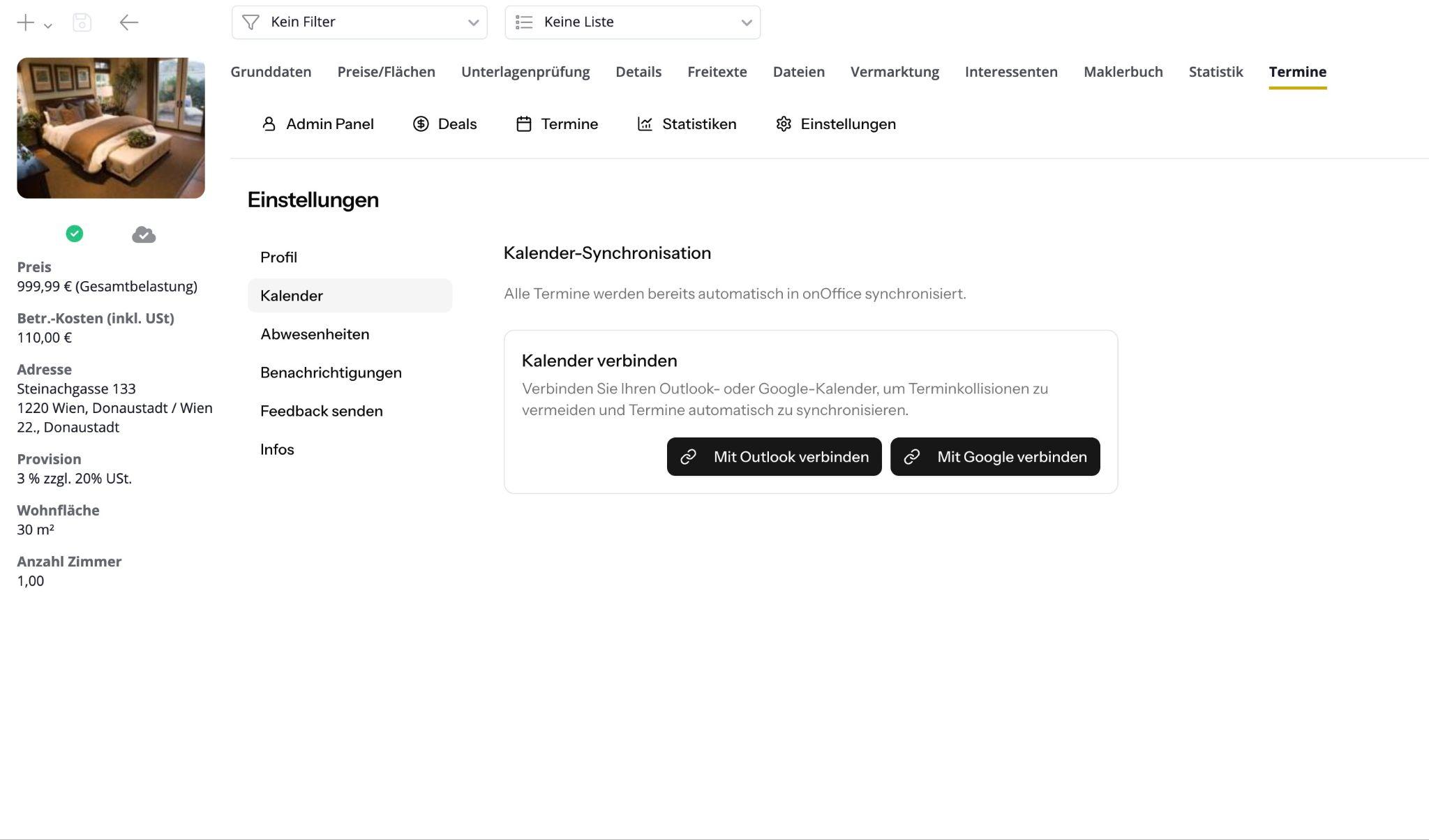
3. Choose your calendar:
- Google Calendar, or
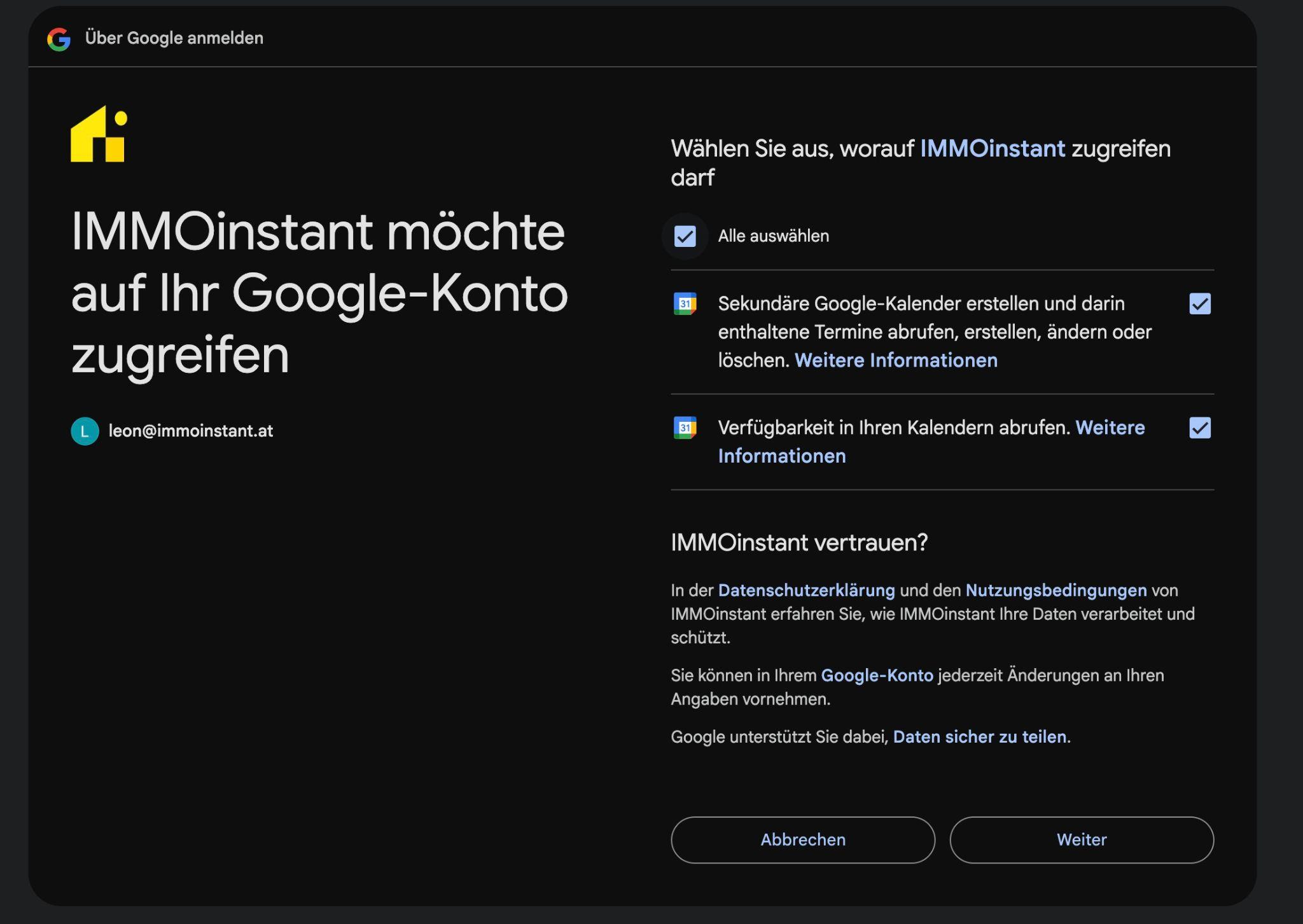
- Microsoft Outlook / Office 365 Calendar
4. Follow the authentication prompt and confirm the connection.
5. Save your settings.
2. Configuration of IMMOinstant per property
IMMOinstant can be set individually for each property, e.g. which calendar slots are used.
A complete explanation of all settings can be found in this video:
▶️ Configuration per property (Loom Video)
https://www.loom.com/share/3f655ef7a53a496dad90fe5cf7deb6fd
Brief overview of the most important steps:
1. Open IMMOinstant.
2. Select the desired property.
3. In the Appointments -> Settings tab, select specific appointment slots for this property.
4. Configure, if desired, the type of appointments, length of the appointment, booking form and much more.
5. Save your settings.
Done!
Once all the steps have been completed, IMMOinstant is fully automated:
- New requests are recognized automatically
- Prospects receive your answer immediately
- Appointments are booked independently
- You save time & increase reaction speed
Further help in service
You can also find further help in the service itself under User settings >> Info >> Helpdesk & Support.